Azure SQL Database is part of a strong, and strengthening overall Data story in Microsoft Azure. The flexibility of the platform, the scalability, both up and out, and the fact that so much functionality is just included all combine to show Azure SQL Database as a great offering. One thing that has been missing that the on-prem (or Azure VM) world continues to enjoy is SQL Server Agent. SQL Agent has long been used for the scheduling and execution of database maintenance tasks relating to indexes, statistics, and on and on. You’ve certainly been able to perform tasks against Azure SQL using PowerShell, Azure Automation, etc. But that familiar ability to schedule the execution of plain old TSQL using plain old TSQL just wasn’t there.
Debra Dove, Principal Program Manager on the SQL Engineering team at Microsoft, announced at Ignite 2016 in September that a shiny NEW Elastic Database Jobs was entering Private Preview. Note that there is an earlier version of Elastic Database Jobs currently in public preview in the Azure Portal. This new version I am showing today will be the path going forward and will replace that current version in the portal. The NEW Elastic Jobs does not include a Portal experience at the time of this writing.
 The new Elastic Database Jobs are designed to echo well the functionality the folks working with SQL Server are accustomed to on-prem with SQL Agent. But it’s even better than that. There are many features that are just baked in that you no longer have to worry about. I’ve presented on the new Elastic Jobs as part of a larger presentation on the overall Elastic tools associated with Azure SQL Database a handful of times. That presentation is called Azure SQL Database Elastic Boogie and references Marcia Griffith’s hit song Electric Boogie (The Electric Slide). Yeah. I know. That will explain the use of the word boogie all over the place.
Even with it just being a very new private preview, my experience has been a great one. Huge kudos to Debra and her team on that.
Note: There are several offerings around Azure SQL Database that include the word “Elastic” in their name: Elastic Database Pools, Elastic Database Query, the Elastic Scale Client .Net library, and Elastic Database Jobs. They all include “Elastic” in order to note how they help you with flexibility in a scaled out/up data tier in Azure SQL Database. You CAN use them all together; it often makes sense to do so. But none of them are requirements for the others. For example, your databases DO NOT need to be in Elastic Database Pools to take advantage of Elastic Database Query, the Elastic Scale Client, or the NEW Elastic Database Jobs.
If you would like to participate in the Private Preview, then feel free to skip down to the Requesting Private Preview Access section at the bottom. I will understand if you want to bypass the transcendent experience of my walkthrough… I guess…
Let’s dig in.
High Level Features of Elastic Database Jobs
1. Asynchronous execution of scripts
This is not meant for interactive querying. You can use Elastic Database Query (currently in public preview) for that. The scripts in your jobs will execute in the background against each target database.
2. Dynamic resolution of target databases
Elastic Database Jobs introduces a feature called a Target Group. When you create a job step, you specify the Target Group for which the job step should execute. Target groups can contain “include” or “exclude” references to Azure SQL Database Servers, Databases, and Elastic Database Pools. When using a Server or a Pool, the targets will be the Databases within those Servers or Pools. Since you can specifically create “exclude” entries in Target Groups, this lets you run your job against, for example, all databases on Server01 EXCEPT DatabaseA.
When the job runs, it starts by querying the entries in the Target Group in order to determine which databases should be targeted. It does this with every execution to make sure the list of targets is accurate at that moment. This is a fantastic feature. In the future, the team plans to allow you to target Resource Groups and Tags as well. I KNOW! RIGHT?! So cool.
Give or take certain special cases around data sovereignty (like Germany and China, for examples), you can execute jobs against databases in any Azure region using a single Elastic Jobs account.
3. Management using TSQL
Currently, during the private preview, you can only manage Jobs using TSQL. However, in the future, they plan to add ability to do so via REST APIs, PowerShell, and the Portal. REMINDER: The Elastic Database Jobs available in the Azure Portal at the time of this writing is the older version, not this new version.
4. Script execution guarantees
The Elastic Jobs engine guarantees “at least once” execution against all target databases. So, if a connection to a particular target databases fails, the engine itself includes configurable retry logic to keep making attempts to connect to that database to execute the job script.
The engine also guarantees that each job will only support one concurrent execution at a time. Suppose you have a job that typically executes in 30 seconds and you run that job every five minutes. If the execution of that job against DatabaseA is taking longer than expected and it still running when five minutes passes and the next execution should begin, the engine will skip DatabaseA and make note in the execution history that a previous execution is still running.
5. Reliable collection of query results to a single table (no duplicates)
You can execute a job that will query all the target databases and bring the results back to a single table for use in reporting, etc. Even if that job must retry against a particular database, it will ensure that no duplicates from multiple attempts are saved to the final destination table. Hereafter, I will refer to the database you use for this purpose as the Jobs Results DB. You can write to a database you use for other purposes as well. I just keep mine dedicated for organizational purposes.
This is a fantastic way to pull information from a scaled out data tier into a central repository for reporting and analytics scenarios.
A Quick Note About Scale
We have teams within Microsoft that rely on this technology to stay within strict reporting SLAs. Those teams have a large infrastructure they use with Azure to manage their business. The Elastic abilities within Azure SQL Database in general and Elastic Database Jobs in particular serve them well. We also have a customer using Elastic Database Jobs to manage a data tier of more than 130,000 Azure SQL Databases. This technology is HUGE for them.
Elastic Jobs Management Database
Once the private preview is activated for your Azure subscription (I will cover this at the end), you will execute some PowerShell to create an Azure SQL Database for the orchestration of Elastic Database Jobs. You can liken this to the role that the msdb system database plays in the on-prem SQL Server world.
This database must be an S2 (currently $75/month) or higher. So, if you want to play with this using Azure credits from an MSDN subscription, you will likely want to create this only when you will be working on it and destroy it when you are done. For the private preview, that is the only cost you really have. You pay for the database, and that’s it. I don’t have information to share on what the pricing will look like at general availability.
Note that you do not need to have the management database, which I will hereafter refer to as the Jobs DB, on a dedicated server. I just chose to do so in my own environment for organizational purposes.
In the Jobs DB you will notice some familiar stored procedures, as shown in my Jobs DB in Figure 1.
Figure 1

In Figure 1, you can see sp_add_job, sp_add_job_step, etc., just like in msdb. You use these stored procedures for creating and managing your jobs, job steps, etc.
This database also contains a view you can use for querying the history of job executions, aptly named job_executions. You can see this along with some other useful views in Figure 2.
Figure 2

Security Setup
For Elastic Jobs to work properly, there are some credentials, logins, and users that must be created.
First, in the context of the Job DB, you need to create a Database Master Key and two database scoped credentials.
-- Create a db master key using your own password.
CREATE MASTER KEY ENCRYPTION BY PASSWORD='NOT 12345';
GO

-- Create a database scoped credential for job execution.
CREATE DATABASE SCOPED CREDENTIAL elasticjobcred
    WITH IDENTITY = 'jobcred', SECRET = 'NOT 12345';
GO

-- Create a database scoped credential for the master database of servers.
CREATE DATABASE SCOPED CREDENTIAL elasticmastercred
    WITH IDENTITY = 'mastercred', SECRET = 'NOT 12345';
GO
The jobcred credential will be used for executing the jobs on the targets databases. The mastercred credential is used to the dynamic determination of Target Groups members on target Servers (including the servers housing target Elastic Pools).
Next, in the context of the master data on each server that houses databases that will be targets (including the server housing the Jobs Results DB), you need to create a login for the jobcred and mastercred as well as a user mapped to the mastercred login.
/* EACH TARGET SERVER (including server to house Jobs Results DB */

/* master database */

CREATE LOGIN jobcred
    WITH PASSWORD = 'same password used for jobcred secret';
GO

CREATE LOGIN mastercred
    WITH PASSWORD = 'same password used for mastercred secret';
GO

CREATE USER mastercred
    FOR LOGIN mastercred
    WITH DEFAULT_SCHEMA = dbo;
GO
Then, on each database that will serve as a target, including the Jobs Results DB, create a jobcred user and add it to the role or roles appropriate for the tasks to be executed on that database.
/* each target database (including Jobs Results DB) */

CREATE USER jobcred
    FOR LOGIN jobcred
    WITH DEFAULT_SCHEMA = dbo;
GO

/* Add user to the database appropriate role(s) */
EXEC sp_addrolemember N'db_owner', N'jobcred';
GO
Note: I used db_owner merely for simplicity of my own demo environment. You can and should make sure the jobcred has only the rights necessary to perform the intended operations.
My Environment
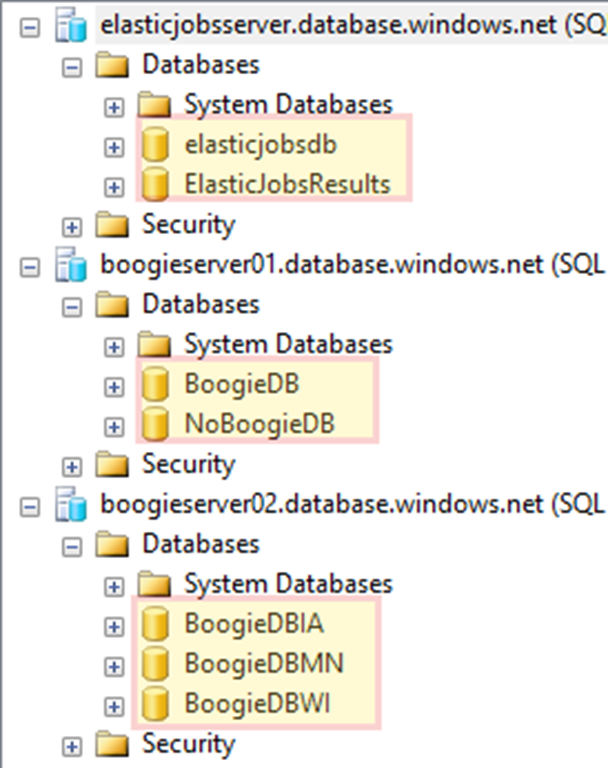
I think it makes sense to quickly show the environment I use for this demo, which is shown in Figure 3.
Figure 3

My elasticjobsserver houses two databases: elasticjobsdb, which is my Jobs DB, and ElasticJobsResults, with is my Jobs Results DB, to which I save query results.
Boogieserver01 houses BoogieDB, and NoBoogieDB, both of which are empty.
Boogieserver01 houses BoogieDBIA, which contains data I fabricated about school children selling chocolate in Iowa. BoogieDBMN is the same for Minnesota and BoogieDBWI is for Wisconsin.
It is important for the walkthrough to note that I have databases on more than one server.
The Schema Update Walkthrough
Once the environment is ready to go, I need to create a Target Group. My group is called BoogieServerGroup.
-- Add a target group containing server(s)
EXEC jobs.sp_add_target_group 'BoogieServerGroup';
Then we need to add a member to this group, in this case boogieserver02.
-- Add a server target member
EXEC jobs.sp_add_target_group_member
      'BoogieServerGroup'
    , @target_type = 'SqlServer'
    , @refresh_credential_name='elasticmastercred'
    , @server_name='boogieserver02.database.windows.net';
You can see in the code above that the @target_type is SqlServer and I am specifying the mastercredential that will be used for querying the list of databases on that server when jobs using this Target Group execute. We can view the members of that target group via the jobs.target_group_members view.
-- View members of target group
SELECT
      target_group_name
    , membership_type
    , target_type
    , server_name
FROM jobs.target_group_members
WHERE target_group_name='BoogieServerGroup';
This leads to the results in Figure 4.
Figure 4
Notice that this is an Include member of the SqlServer target type. As noted earlier, you can create Exclude members as well. Those will be skipped when the Target Group is used for job execution.
Now, it’s time to create a job. This job will house a step to create a new table, dbo.ElectricSlide, in all target databases.
-- Add job for create table
EXEC jobs.sp_add_job @job_name='CreateTableElectricSlide'
    , @description='Create Table ElectricSlide';
Then we need to create a job step for that job. At this time in the private preview, each job can have a maximum of one job step and that job step must be TSQL. Given that this step could be executed against databases multiple times, it is important that the query be idempotent.
-- Add job step for create table
EXEC jobs.sp_add_jobstep
      @job_name='CreateTableElectricSlide'
    , @command = N'IF NOT EXISTS (SELECT * FROM sys.tables
               WHERE object_id = object_id(''ElectricSlide''))
            CREATE TABLE [dbo].[ElectricSlide]([ElectricSlideId] [int] NOT NULL);'
    , @credential_name= 'elasticjobcred'
    , @target_group_name='BoogieServerGroup'
We can view the job step definition.
-- View the job step definition
SELECT
      [job_name]
    , [step_id]
    , [command_type]
    , [command]
    , [credential_name]
    , [target_group_name]
FROM [jobs].[jobsteps]
WHERE job_name = 'CreateTableElectricSlide';
This produces the results in Figure 5.
A quick look at the Boogie databases on both servers shows none of them contain a table called dbo.ElectricSlide, as shown in Figure 6.
Figure 6
Let’s execute our job.
-- Execute the latest version of a job
exec jobs.sp_start_job 'CreateTableElectricSlide'
Once our job is running, we can query the latest (in this case, currently running) execution of the job.
-- View latest execution
SELECT
      is_active
    , lifecycle
    , last_message
    , target_type
    , target_group_name
    , target_server_name
    , target_database_name
FROM jobs.job_executions
WHERE job_name = 'CreateTableElectricSlide'
AND job_execution_id =
    (
    SELECT job_execution_id FROM jobs.job_executions
    WHERE step_id IS NULL and create_time =
        (
        SELECT MAX(create_time)
        FROM jobs.job_executions WHERE step_id IS NULL
        )
    )
ORDER BY start_time DESC;
GO
If we execute the above query immediately after starting the job, our results look like Figure 7.
Figure 7
Notice that the bottom row is WaitingForChildJobExecutions. In this case, the one child job running is the first row with the target_type of TargetGroup and the target_group_name of BoogieServerGroup. This is the child job that is querying the master database on boogieserver02, the only member of BoogieServerGroup, to find the databases on which to run the script in the job step.
After a few seconds, running that same query produces the results in Figure 8.
Figure 8
The list of databases has been determined and a child job execution has been created for each target database.
Once the job completes, the results of that query look like Figure 9.
Figure 9
In this case, all child job executions have succeeded, and therefore the overall job execution has succeeded.
If we look again at our 4 Boogie databases (3 on boogieserver02 and 1 on boogieserver01), we see what is in Figure 10.
Figure 10
All of the databases on boogieserver02 now have a dbo.ElectricSlide table. BoogieDB, since it is not on boogieserver02, does not.
Let’s add the BoogieDB database on boogieserver01, but only that database, to our BoogieServerGroup target group.
-- Add a database target member
EXEC jobs.sp_add_target_group_member
      'BoogieServerGroup'
    , @target_type = 'SqlDatabase'
    , @server_name='boogieserver01.database.windows.net'
    , @database_name='BoogieDB'
Once we execute this, we can query out BoogieServerGroup again to list it members.
--View the recently added database in target group
SELECT
      target_group_name
    , membership_type
    , target_type
    , server_name
    , [database_name]
FROM jobs.target_group_members
WHERE target_group_name='BoogieServerGroup';
The results now look like Figure 11.
Figure 11
Notice we have two different target_type values, SqlServer for boogieserver02 and SqlDatabase for the row for the BoogieDB database member. This shows that the same target group can contain members of multiple types.
Let’s execute our job again.
-- Execute the latest version of a job
exec jobs.sp_start_job 'CreateTableElectricSlide';
This time, I’ll just show the final results of the job execution. See Figure 12.
Figure 12
Notice that only the BoogieDB database from boogieserver01, not NoBoogieDB, is included. After all, how can you have an ElectricSlide if you have NoBoogie?
If we look at all of the Boogie databases again, we see that they all now have the dbo.ElectricSlide table, as shown in Figure 13.
Figure 13
As you can see, the new Elastic Database Jobs can be huge boon when managing a scaled out data tier.
Query Results Walkthrough
In this walkthrough, we will query all the databases in our target group and bring the results back to a single table in my Jobs Results DB, ElasticJobsResults.
We will use the BoogieServerGroup target group for this next phase as well. However, we will remove the BoogieDB target member since that is an empty database and therefore does not have the table that is the target of our query.
-- Remove a server target member
DECLARE @mytarget_id uniqueidentifier

SET @mytarget_id =
    (
    SELECT target_id FROM jobs.target_group_members
    WHERE [database_name] = 'BoogieDB'
    );

EXEC jobs.sp_delete_target_group_member
      @target_group_name = 'BoogieServerGroup'
    , @target_id = @mytarget_id;
Now, when we query the BoogieServerGroup, it should only have 1 member, boogieserver02, as shown in Figure 14.
Figure 14
Let’s create a job for collecting results from the data tier.
-- Add a job to collect results
EXEC jobs.sp_add_job
      @job_name ='ResultsJob'
    , @description='Collection data from all databases';
Now we can add a job step for collecting those results.
-- Add a job step to collect results
EXEC jobs.sp_add_jobstep
@job_name='ResultsJob',
@command= N'SELECT DB_NAME() AS DatabaseName, SchoolID, SchoolName FROM dbo.School;',
@credential_name='elasticjobcred',
@target_group_name='BoogieServerGroup',
@output_type='SqlDatabase',
@output_credential_name='elasticjobcred',
@output_server_name='elasticjobsserver.database.windows.net',
@output_database_name='ElasticJobsResults',
@output_schema_name='dbo',
@output_table_name='School';
You can see this job step uses more parameters than our table creation example above. This one specifies the server, database, schema, table into which the results of the query are to be stored. In this simple example, I am merely querying the dbo.School table in each target database. I will bring the results back to my ElasticJobsResults database into a table called dbo.School. Note that this will create the destination table if it does not already exist. This is a good thing since the query results include a field that I do not have in my query.
Let’s go ahead and execute this job.
-- Execute the latest version of a job
exec jobs.sp_start_job 'ResultsJob';
Here is my job tracking query again, this time look at ResultsJob.
-- View latest execution
SELECT
      is_active
    , lifecycle
    , last_message
    , target_type
    , target_group_name
    , target_server_name
    , target_database_name
FROM jobs.job_executions
WHERE job_name = 'ResultsJob'
AND job_execution_id =
    (
    SELECT job_execution_id FROM jobs.job_executions
    WHERE step_id IS NULL and create_time =
        (
        SELECT MAX(create_time)
        FROM jobs.job_executions WHERE step_id IS NULL
        )
    )
ORDER BY start_time DESC;
GO
The final results are shown in Figure 15.
Figure 15
Sweet. We now have a dbo.School table in the ElasticJobsResults database, as shown in Figure 16.
Figure 16
Let’s query it.
SELECT * FROM dbo.School;
The results are shown in Figure 17.
Figure 17
Note that the results include the internal_execution_id of the child job that retrieved each record. So, the Elastic Jobs engine is providing some ready-made lineage information for us. I also want to point out that the SchoolID in my dbo.School table in all of my Boogie databases is an identity column starting at 10000. Each one includes only a single record. Therefore, in each database, the single school present has a SchoolID of 10001.
This is a super simple example of querying an entire data tier with a single query using Elastic Database Jobs.
I hope you can see how exciting this is for the Azure SQL Database story. So far, the reception has been great. I demoed it for a customer the other day and the response was, “WOW! This is EXACTLY what we needed.” The Data story in Azure just keeps getting better and better.
Requesting Private Preview Access
Debra and her team are looking for participants for the Private Preview of the shiny new Elastic Database Jobs. If you would like to participate, and I would encourage you to do so, please email me using my Microsoft address, which is mark dot vaillancourt at microsoft dot com. Include a brief description of your role and your environment. I will connect you with Debra, who can get you started.

















































You must be logged in to post a comment.